

The Enviroweb dashboard enables you to assign additional domains to your hosting account. You can assign these as either a Parked or Addon domain.
Parked Domain: A parked domain is a domain name that is registered but not actively used for a website or email.
Addon Domain: An addon domain is a fully functional domain that you can host on your existing hosting account, in addition to your primary domain. It allows you to manage multiple domains and websites from a single hosting account without needing to purchase additional hosting packages. The number of addon domains you can have is determined by the hosting package you purchase.
To park or addon a domain to your hosting account, follow these steps:
1. From your Enviroweb dashboard, click Domains > My Domains
2. Select the domain you wish to manage from your list of domains
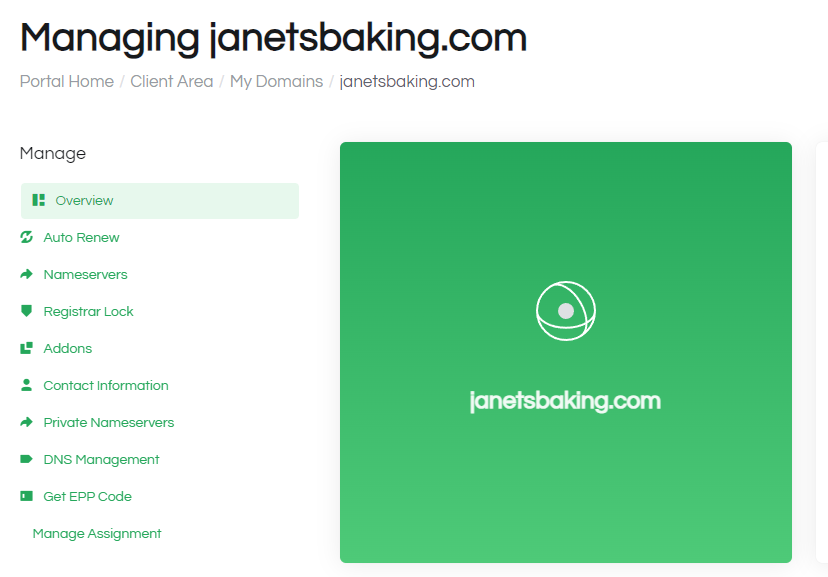
3. On the Managing mydomain.com page, click Manage Assignment at the bottom of the sidebar.
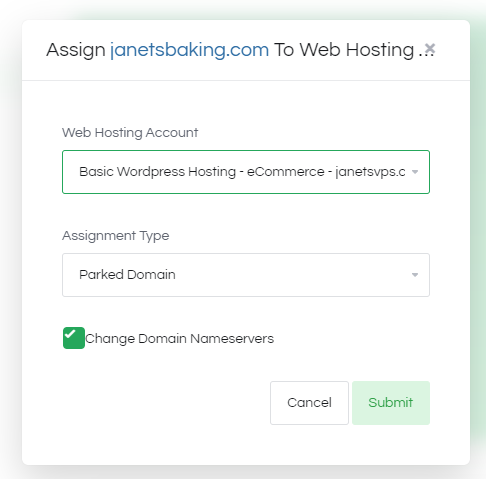
4. Choose the Web Hosting Account and Assignment Type and if you would like to Change Domain Nameservers
5. Once complete, you will see a success banner appear on the managing domain page.
6. When logging in to your hosting control panel, you will now see the domain listed in the domains page. If you are using the Enviroweb nameservers, you will be able to manage your DNS zones for this domain from here.
