

cPanel supports a wide range of languages, allowing users to interact with the interface in their preferred language. If you'd like to change the language displayed in your cPanel dashboard, just follow the steps below.
Step 1: Log in to cPanel
Access your cPanel account using your login credentials.
Step 2: Navigate to the Change Language Option
In the Preferences section of the cPanel homepage, click on Change Language.
Step 3: Select Your Preferred Language
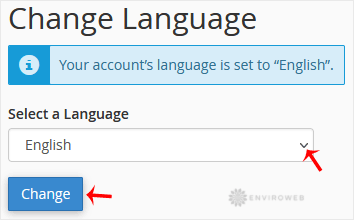
From the drop-down menu, choose your desired language and then click Change to save your preference.
Your cPanel interface will now display in the selected language. You can return to this menu at any time to change it again.
