Cron jobs are scheduled tasks that run automatically at specified intervals on your server. They are commonly used to automate repetitive processes such as database backups, email reports, or running PHP scripts at set times without manual input.
Note: Cron jobs are considered an advanced feature. Incorrect settings can lead to server resource overuse or scripts running unexpectedly. Proceed only if you're familiar with command scheduling.
Step 1: Log in to your cPanel account.
Step 2: In the Advanced section, click on Cron Jobs.
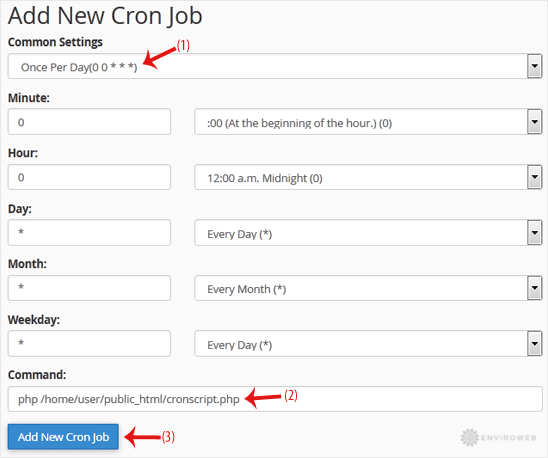
Step 3: Under Add New Cron Job, open the Common Settings drop-down and select how often you want your command to run (e.g., Once Per Day).
Step 4: In the Command field, enter the full path to your script or the command you want to run.
Step 5: Click Add New Cron Job to save it.