Cron jobs allow you to schedule scripts and commands to run automatically at specific times. If you’ve already set up a cron job and need to update or remove it, cPanel makes it simple to manage your existing jobs directly from the interface.
Note: Editing or deleting cron jobs should be done with care. Mistakes could cause important scripts to stop running or run too frequently, affecting your website or server performance.
How to Edit an Existing Cron Job
Step 1: Log in to your cPanel account.
Step 2: In the Advanced section, click on Cron Jobs.
Step 3: Scroll down to the Current Cron Jobs section. Locate the cron job you want to update and click Edit.
Step 4: Make your desired changes and click Edit Line to save them.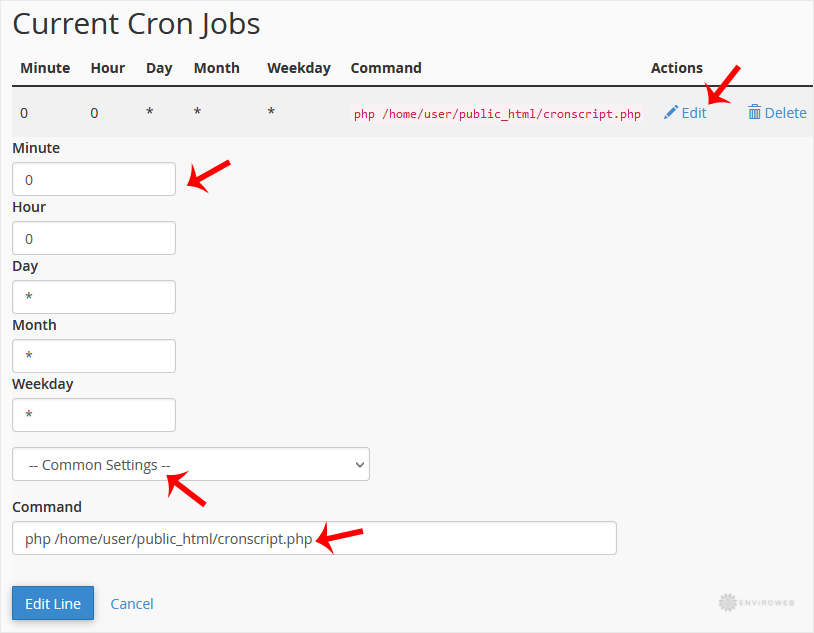
How to Delete a Cron Job
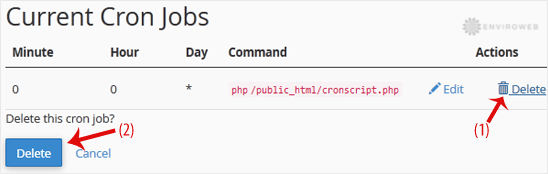
Step 1: Under the Current Cron Jobs section, find the cron job you want to remove and click Delete.
Step 2: Confirm the deletion by clicking Delete again when prompted.