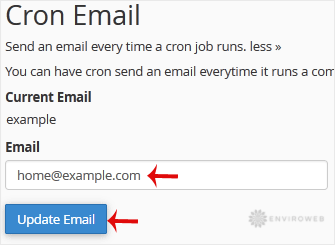
cPanel gives you the option to receive email notifications each time a cron job runs. This can be useful for monitoring scheduled tasks or confirming that automated scripts are executing correctly. If you’d like to enable notifications or update the email address used for cron alerts, follow these steps.
Note: You will receive an email every time a cron job runs. If your jobs run frequently, this can result in a high volume of emails which increases server load and disk use. Consider only enabling notifications for essential or infrequent tasks.
Step 1: Log in to your cPanel account.
Step 2: In the Advanced section, click on Cron Jobs.
Step 3: In the Cron Email section, enter the email address where you’d like to receive notifications.
Step 4: Click on Update Email to save your changes.