

You can block access to your website for specific visitors by blacklisting their IP address using the IP Blocker tool in cPanel. This can help improve your site’s security by preventing unwanted or malicious access.
Step 1. Log in to your cPanel account.
Step 2. In the Security section, click on IP Blocker.
Step 3. Under Add an IP or Range, enter the IP address or range of IPs you wish to block.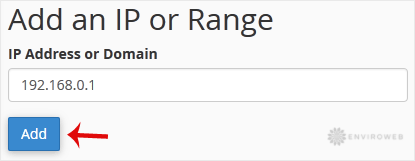
Step 4. Click on Add to save and apply the block.
Examples of valid input formats:
- Single IP Address: 192.168.0.1
- IP Range: 192.168.0.1-192.168.0.40
- Implied Range: 192.168.0.1-40
- CIDR Format: 192.168.0.1/32
- Wildcard: 10.*.*.* or 192.*.*.*
