

How to Remove Sample Content in WordPress

When you install WordPress, it comes with some sample posts, pages, and comments to help you get started. To clean up your site and remove these sample items, follow the steps below.
By default, WordPress adds sample content that you can easily remove. Here’s how to delete sample posts, pages, and comments:
Step 1: Log in to your WordPress dashboard.
Step 2: From the Dashboard menu, go to Posts and click on All Posts.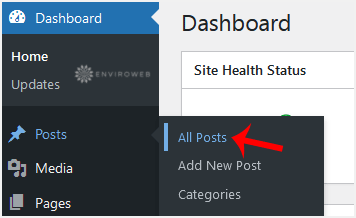
Step 3: Hover your mouse over the sample post, then click on Trash to remove it.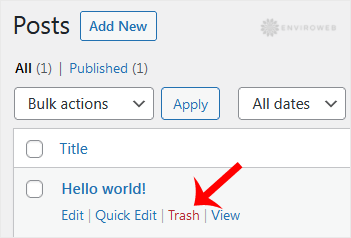
Step 4: Next, remove the sample pages. From the Dashboard menu, hover over Pages, click on All Pages, and remove any sample pages.
Step 5: Similarly, you can delete sample comments. Click on Comments in the Dashboard, hover over a comment, and click on Trash to delete it.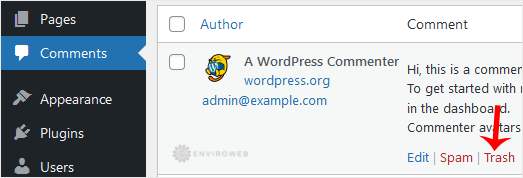
Once you complete these steps, your WordPress site will be clean of all sample content, allowing you to start with your own posts, pages, and comments.
