

If your website or application requires a specific version of PHP, you can easily switch between versions using cPanel’s MultiPHP Manager. This tool allows you to set different PHP versions per domain or subdomain, ensuring compatibility with your software.
Note: Always ensure the version you switch to is supported by your application. Using an unsupported version may lead to unexpected behaviour or security vulnerabilities.
Step 1: Log in to your cPanel account.
Step 2: In the Software section, click on MultiPHP Manager.
Step 3: Scroll down to the list of domains. Select the checkbox next to your domain on the left-hand side.
Step 4: From the PHP Version drop-down menu on the right, choose the PHP version you want to use and click Apply.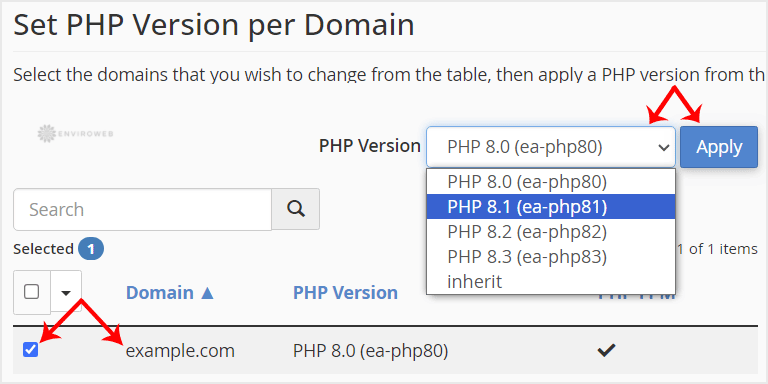
After applying the change, your domain will begin using the selected PHP version within a few seconds.
