

If you've changed the PHP version for your domain but would now like to revert it back to the default server version, cPanel makes this process simple using the MultiPHP Manager.
Note: Resetting to the default PHP version may cause your website or applications to stop functioning correctly if they rely on features from a different PHP version. Always check compatibility before reverting to avoid unexpected issues.
Step 1: Log in to your cPanel account.
Step 2: In the Software section, click on MultiPHP Manager.
Step 3: Scroll down to the list of domains. Select the checkbox next to your domain.
Step 4: On the right side, open the PHP Version drop-down menu and choose the option labeled inherit or default (depending on your hosting setup). Then click Apply.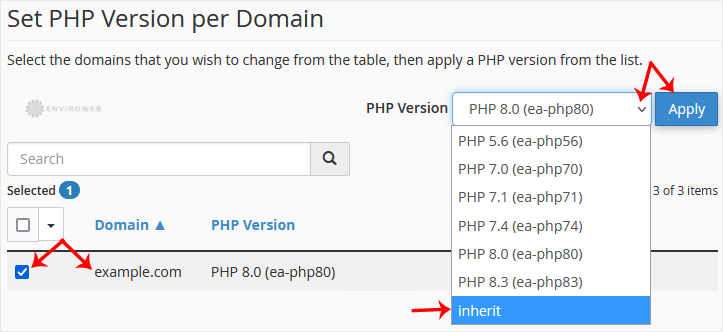
Your domain will now return to using the default PHP version defined by your server. This change usually takes effect within a few seconds.
