

CNAME (Canonical Name) records are used to create alias domain names that point to another domain name. For example, you can use a CNAME record to point www.example.com to example.com or another external address. This is useful for simplifying DNS management and maintaining consistent branding.
Note: CNAME changes may take between 12 to 24 hours to fully propagate across the internet.
Step 1: Log in to your cPanel account.
Step 2: In the Domains section, click on Zone Editor.
Step 3: Locate your domain under the Domains list, and under the Actions column, click on +CNAME Record.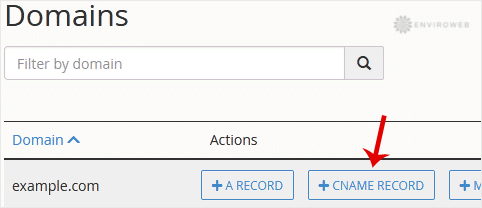
Step 4: In the popup box that appears, enter the following:
- Name: The subdomain you want to alias, such as
www. This will becomewww.example.com. - CNAME: The domain you want to point the alias to, such as
example.net.
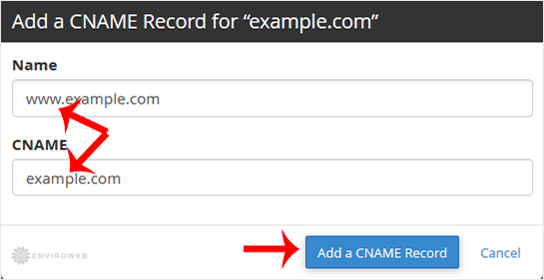
Step 5: Click Add a CNAME Record to save your changes.
Once added, the new alias should begin functioning after DNS propagation completes. This may take several hours, so changes may not be immediate across all regions.
