

MX (Mail Exchanger) records determine where email messages sent to your domain should be delivered. If you need to update or remove an existing MX record — for example, when switching to a new mail provider — you can do so through cPanel’s Zone Editor. This tool gives you full control over your domain’s DNS settings.
Note: Changes to DNS records, including MX records, may take between 12 to 24 hours to fully propagate across the internet.
Step 1: Log in to your cPanel account.
Step 2: In the Domains section, click on Zone Editor.
Step 3: Locate the domain for which you'd like to edit or remove the MX record. Then click Manage under the Actions column.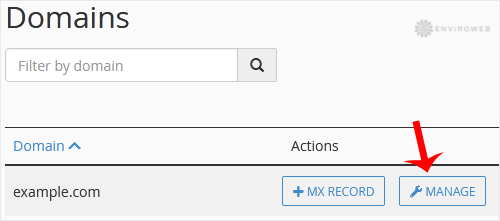
Step 4: Scroll through the list of DNS records until you find the MX record you wish to edit or remove.
To edit: Click Edit, update the Priority or Destination values, and then click Save Record.
To delete: Click Delete next to the record you wish to remove.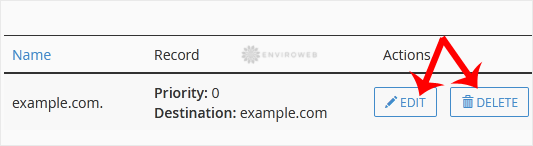
After editing or deleting a record, cPanel will confirm the change. Email routing may be affected during DNS propagation, so it’s a good idea to plan updates during low-traffic hours whenever possible.
