

Why Manually Install Plugins?

Manually installing a plugin is useful when you have a custom plugin or need to install a plugin that isn’t available in the WordPress Plugin Repository. You can do this by downloading the plugin ZIP file and uploading it directly to your WordPress site.
Follow these steps to manually install a plugin in WordPress:
Step 1: Log in to the WordPress dashboard.
Step 2: From the Dashboard menu, go to Plugins and click on Add New.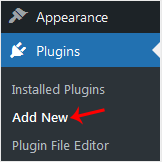
Step 3: Click on Upload Plugin and then click on Browse. Choose your plugin's ZIP file and click Install Now.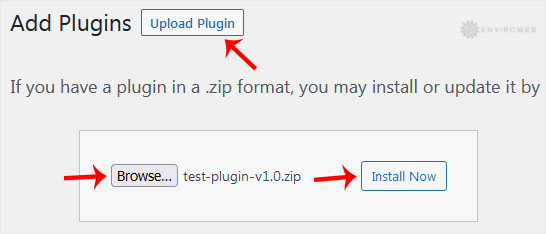
Step 4: Click on Activate Plugin once the installation is complete.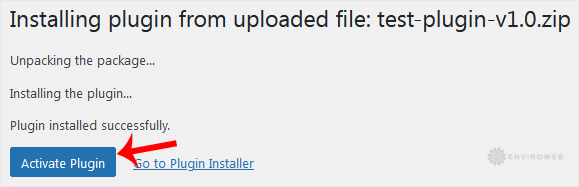
Note: After activating the plugin, a new menu for that plugin will be added to the Dashboard. If the plugin requires any additional setup, it will prompt you to configure it.
