

Why Change Your WordPress Password?

Changing your password regularly is a good security practice. If you have access to your WordPress account, you can easily update your password from the WordPress dashboard.
Follow these steps to change your WordPress password:
Step 1: Log in to the WordPress dashboard.
Step 2: From the Dashboard menu, go to Users and click on Profile.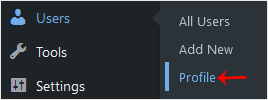
Step 3: Scroll down to the Account Management section and click on Set New Password.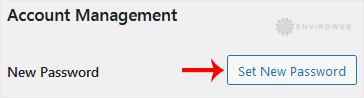
Step 4: Copy the new password to a safe place and click on Update Profile to change your password.
Your WordPress password has been successfully updated.
