

Regular website backups are essential to protect your data from accidental loss, server issues, or website errors. With cPanel's built-in Backup Wizard, you can easily create and download a backup of your site in just a few steps.
Step 1: Log in to your cPanel account.
Step 2: In the Files section, click on Backup Wizard.

Step 3: On the Backup or Restore page, click on Back Up.
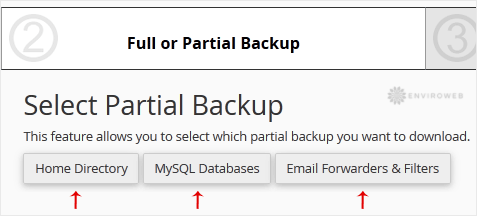
Step 4: Under Select Partial Backup, choose the section you’d like to back up. For example, to back up your website files, click on Home Directory.
Step 5: Click Download to begin downloading the backup file to your computer.
Tip: It's recommended to back up your website regularly, especially before making major changes like updates or migrations. Keep your backups stored in a safe location separate from your hosting account.
