

If you want to provide FTP access to a specific folder on your hosting account — without giving access to the full directory — you can create a separate FTP user through cPanel. This is especially useful for developers, collaborators, or web apps that require access to only part of your site.
Note: You can also use your main cPanel login credentials to connect to FTP, which provides full access to the home directory. Creating individual FTP accounts is recommended for security and access control.
Step 1: Log in to your cPanel account.
Step 2: In the Files section, click on FTP Accounts.
Step 3: Under Add FTP Account, fill in the following details:
- Log in: Enter your desired username (e.g.,
new-user). - Password: Create a strong password or use the built-in password generator.
- Directory: Specify the folder this account should have access to. To allow access to your main website files, use
public_html. To restrict access to a subfolder, set it to something likepublic_html/new-user. - Quota: Set a disk usage limit in MB, or choose Unlimited.
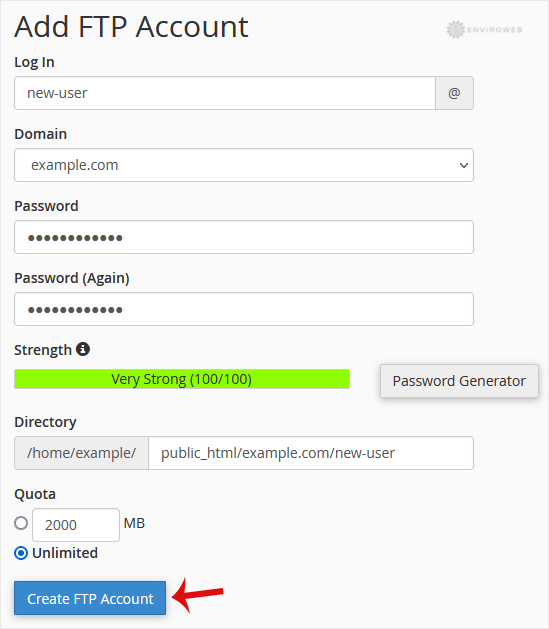
Step 4: Click on Create FTP Account.
Once created, the FTP user can connect using an FTP client such as FileZilla. Use the following details when setting up the connection:
- Host: Your domain name or server IP (e.g.,
ftp.example.com) - Username: The full FTP username (e.g.,
[email protected]) - Password: The password you created for the FTP user
- Port:
21(default FTP port)
You’ve now successfully created and configured an FTP account with directory-specific access.
