

Deleting unused or unnecessary FTP accounts is a good way to keep your hosting environment organized and secure. If you no longer need an FTP account, you can remove it from your cPanel with just a few clicks.
Step 1: Log in to your cPanel account.
Step 2: In the Files section, click on FTP Accounts.
Step 3: Under the FTP Accounts list, locate the account you wish to delete and click on Delete.
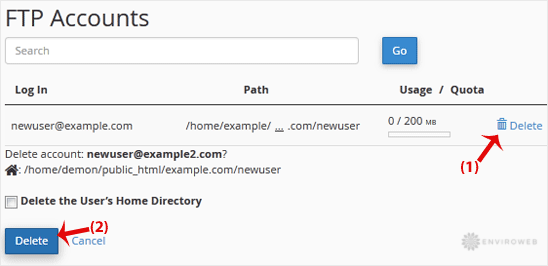
Step 4: On the confirmation screen, click on Delete again to remove the FTP account.
⚠️ Warning: Do not select the option to "Delete the User’s Home Directory" unless you are absolutely sure. This will permanently delete all files associated with that FTP account and cannot be undone unless a backup is available.
Once deleted, the FTP account will be removed from the list, and it will no longer have access to your server.
