

If you need to increase or limit the storage space assigned to an FTP account, you can do so directly from within cPanel. This is useful for managing disk space usage or allowing unlimited storage for trusted users.
Step 1: Log in to your cPanel account.
Step 2: In the Files section, click on FTP Accounts.
Step 3: Under the FTP Accounts list, find the user you want to modify and click on Change Quota.
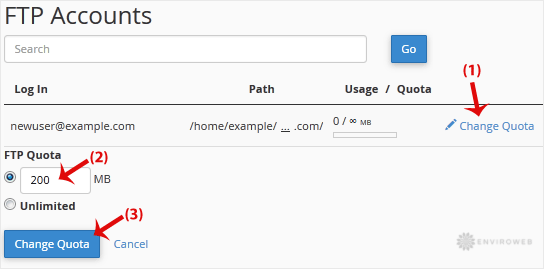
FTP Quota: Enter a specific storage limit in megabytes (e.g., 100 for 100MB) or select Unlimited to remove restrictions on storage usage.
Step 4: Click on Change Quota to apply the new setting.
The changes will take effect immediately, and the account will reflect the updated quota limits.
