

Security is important for protecting your data. We recommend enabling Two-Factor Authentication (2FA) on your cPanel account to add an extra layer of protection. This helps prevent unauthorised access even if someone obtains your account login details.
Requirements:
You will need a smartphone with a time-based one-time password (TOTP) app installed. Popular options include Google Authenticator, Microsoft Authenticator, and Authy. These apps are available for Android and iOS.
Step 1. Log in to your cPanel account.
Step 2. In the Security section, click on Two-Factor Authentication.
Step 3. Click on Set Up Two-Factor Authentication. Under Step 1, scan the QR code using your authenticator app. If your app doesn’t support QR codes, you can enter the account name and key manually.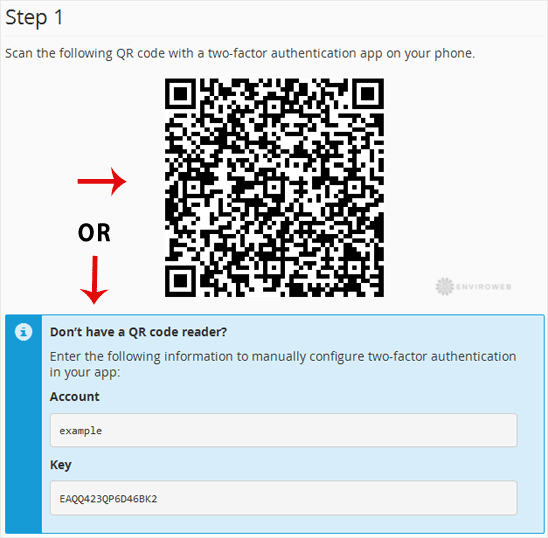
Step 4. Under the Security Code field, enter the code displayed in your 2FA app. Then click Configure Two-Factor Authentication.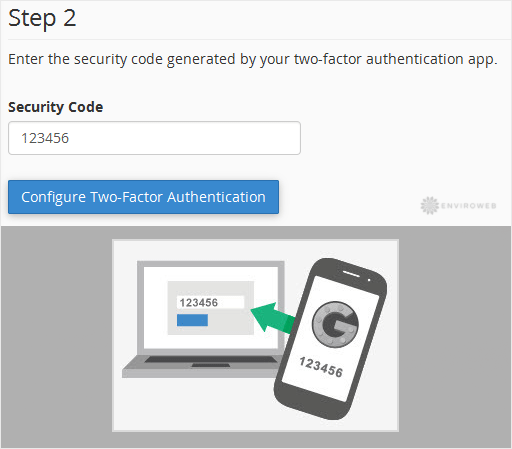
If successful, you’ll see a message saying: Success: Two-factor authentication is now configured on your account.
