

If you purchased an email plan as an addon to a hosting plan we will automatically attempt to update your MX records to the ones below. If this fails or if you purchased the plan as a standalone service you may need to update them manually.
To update your MX records, follow these steps:
For the purpose of this tutorial, we will explain the steps using the Enviroweb cPanel DNS Zone editor. If your domain or site is hosted with another provider, you will need to update your records there.
Update MX Records
1. Login to your Enviroweb hosting account, scroll down to Domains and click Zone Editor
2. Click Manage and then filter the results by MX records

3. If you do not have the following MX records in your list, add ALL of them in by clicking +Add Record
|
Name/Host/Alias |
Time to live (TTL) |
Record Type |
Priority |
Value/Answer/Destination |
|---|---|---|---|---|
|
@ or leave blank |
3600 | MX | 10 |
mx001.cloudus.rs.oxcs.net |
|
@ or leave blank |
3600 | MX | 10 |
mx002.cloudus.rs.oxcs.net |
|
@ or leave blank |
3600 | MX | 10 |
mx003.cloudus.rs.oxcs.net |
|
@ or leave blank |
3600 | MX | 10 | mx004.cloudus.rs.oxcs.net |
An example of the MX record configuration for example.com:
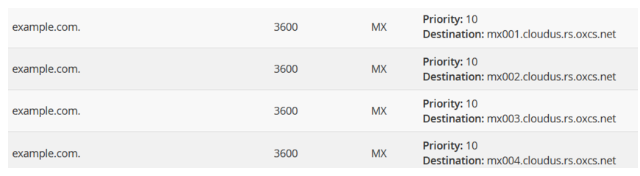
4. Once you have saved the record please allow up to 48 hours for any DNS changes to fully propagate. Not all DNS changes take this long but we strongly advise updating any DNS records outside of your normal business hours where possible to minimise any impact to your operations.
Update SPF Records
1. Follow the above steps to navigate to the Zone Editor in your hosting panel
2. Filter records by TXT

3. Click + Add Record
4. Enter the following details for the SPF record
|
Name/Host/Alias |
Time to live (TTL) |
Record Type |
Value/Answer/Destination |
|---|---|---|---|
|
@ or leave blank |
3600 |
TXT |
v=spf1 include:spf.cloudus.rs.oxcs.net ~all |
An example of the SPF records for example.com:

5. Once you have saved the record please allow up to 48 hours for any DNS changes to fully propagate. Not all DNS changes take this long but we strongly advise updating any DNS records outside of your normal business hours where possible to minimise any impact to your operations.
