

Creating a MySQL database in cPanel is a straightforward process that allows you to store and manage data for your website or applications. Follow the steps below to create a new database using the built-in MySQL Databases tool in cPanel.
Step 1: Log in to your cPanel account.
Step 2: In the Databases section, click on MySQL Databases.

Step 3: In the New Database field, enter a name for your new database. Choose a name that is short and relevant to its purpose.
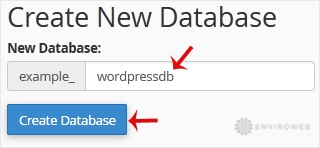
Step 4: Click on Create Database to complete the process.

Your new database will now be listed under the current databases section. You can proceed to create users and assign them to this database with specific privileges if needed.
