

Disclaimer:
Deleting a MySQL database is permanent and cannot be undone. Make sure to take a full backup before proceeding, especially if the database is used by an active website or application.
Step 1: Log in to your cPanel account.
Step 2: In the Databases section, click on MySQL Databases.

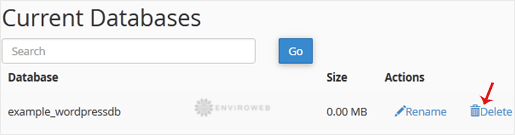
Step 3: Under the Current Databases section, you will see a list of all your databases. Locate the database you want to delete and click on Delete.
Step 4: Confirm your action by clicking on Delete Database.

