

Step 1: Log in to your cPanel account.
Step 2: In the Databases section, click on phpMyAdmin.

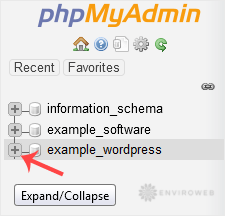
Step 3: In the left sidebar, click the expand icon next to the database you want to optimise to reveal its tables.
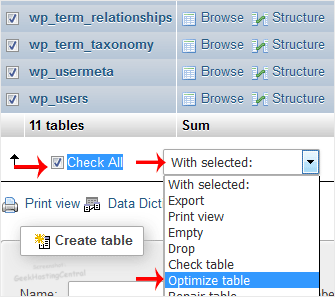
Step 4: Scroll down the list of tables and click the checkbox next to Check All to select all tables.
Then, from the drop-down menu at the bottom, choose Optimize table and wait a few seconds for the optimisation process to complete.
Once complete, you will see a confirmation message indicating that your database tables have been successfully optimised.
