

Step 1: Log in to your cPanel account.
Step 2: In the Databases section, click on phpMyAdmin.

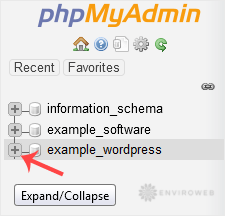
Step 3: Click the expand icon from the navigation tree in the left sidebar to reveal your database tables.
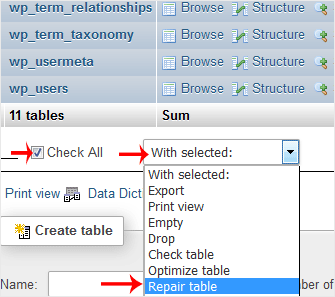
Step 4: Scroll to the bottom of the list and tick the checkbox next to Check All to select all tables.
From the drop-down menu, select Repair table to begin the repair process.
If the repair was successful, an OK message will appear next to each table. If there are issues, phpMyAdmin will display errors for the affected tables.
