

SiteLock provides you with a trust seal for your website so you can show your visitors and customers that you don't leave your website security to chance. Your trust seal is provided as a snippet of code that is placed in your website footer and sitelock gives you the ability to customise it to your own liking so that it fits in with your site theme.
To get your trust seal, follow these steps:
1. Login to SiteLock Security from your Enviroweb Dashboard
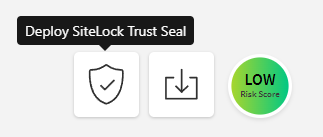
2. On the right side of your SiteLock Dashboard, click the shield icon that says Deploy SiteLock Trust Seal
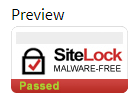
3. You will be shown a preview of your trust seal during its configuration
4. Select the Language you want your seal to display in and click Next
5. Select the Colour, Size and Style
6. Once configured, you will be provided a code snippet to be placed in the footer of your website.
SiteLock Trust Seal FAQs
My Trust Seal suddenly disappeared off of my site. What happened?
This can be due to a number of reasons:
- Your site got infected with malware or a vulnerability and was not resolved after 72 hours. You do not need to make any changes to your Trust Seal code if this is the case. After you have resolved these issues, the Trust Seal will automatically be displayed again on your website.
- You may have made a change to your site that replaced the code.
Why isn’t my website’s name or URL showing up in the Trust Seal?
This happens when the domain name is too long to fit into the space. Try using a larger Trust Seal in the settings.
I updated the size/color/style of the Trust Seal after installing it, but it hasn’t updated. What happened?
Clear your cache and cookies in all of your browsers.
Can SiteLock customize my Trust Seal further than the preset options?
No, the Trust Seal cannot be customized further than the preset options.We do not accommodate any customization requests.
I chose “Secure” as my style but it still only says “Malware Free” on my site. Why is that?
You must have a premium or higher scanner to be able to display “Secure”.
Do I have to have the firewall to use the Trust Seal?
No, the TrustSeal doesn't require firewall. It pulls data from scanners.
My Trust Seal is displaying an older date. Why is that?
The date displayed will be the last scan that was run and came back clean. Please check your scan frequency settings if it is displaying an older date.
