

You can automatically forward incoming emails to another email address or even a custom mail handler script using cPanel. This is helpful if you want to manage multiple email addresses from a single inbox or trigger a script when an email is received.
Step 1: Log in to your cPanel account.
Step 2: In the Email section, click on Forwarders, then select Add Forwarder.
Step 3: Enter the following details:
- Address to Forward: Enter the local part of the email address (e.g.
myemailif your full address is[email protected]). - Domain: Choose the appropriate domain from the drop-down list if you have multiple domains.
- Destination: Select Forward to Email Address and enter the destination email address where you'd like messages forwarded.
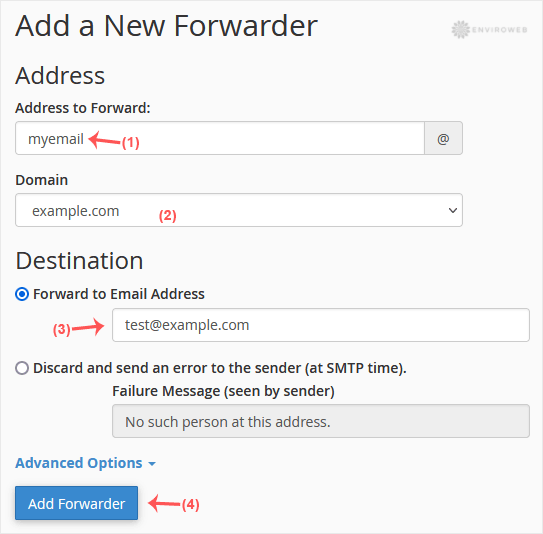
Step 4: Click on Add Forwarder to save the changes.
How to Forward an Email to a Mail Pipe Script/Program
This option is useful if you want to forward email input to a custom PHP script (e.g. for automated processing, logging, or support ticket systems).
Step 1: From the Email section in cPanel, click on Forwarders, then choose Add Forwarder.
Step 2: Fill in the following fields:
- Address to Forward: Enter the user/email prefix.
- Domain: Select the correct domain from the drop-down list.
Step 3: In the Destination section, click on Advanced Options, then select Pipe to a Program. Enter the path to your script (excluding the leading slash), e.g. home/username/public_html/myemailpipe.php.
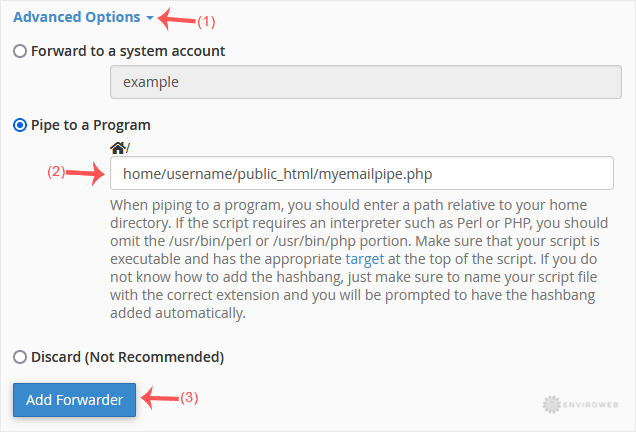
Step 4: Click Add Forwarder to complete the setup.
